
Module 1: Phishing acts as the critical entry point for the SPARTA project’s cybersecurity curriculum. In an era where digital tools are integral to sports management, this module addresses the most pervasive threat facing organizations today: social engineering. rather than overwhelming coaches with abstract technical theory, the module adopts a narrative-driven learning approach. By immersing the learner in the realistic and relatable story of “Coach Mr. Müller,” the training demonstrates how easily psychological manipulation can bypass even the most seasoned professional’s defenses .
The module is structured to guide the learner through the entire lifecycle of a cyberattack, identifying specific vulnerabilities at each stage:
1. The Scenario: The Setup and The Lure
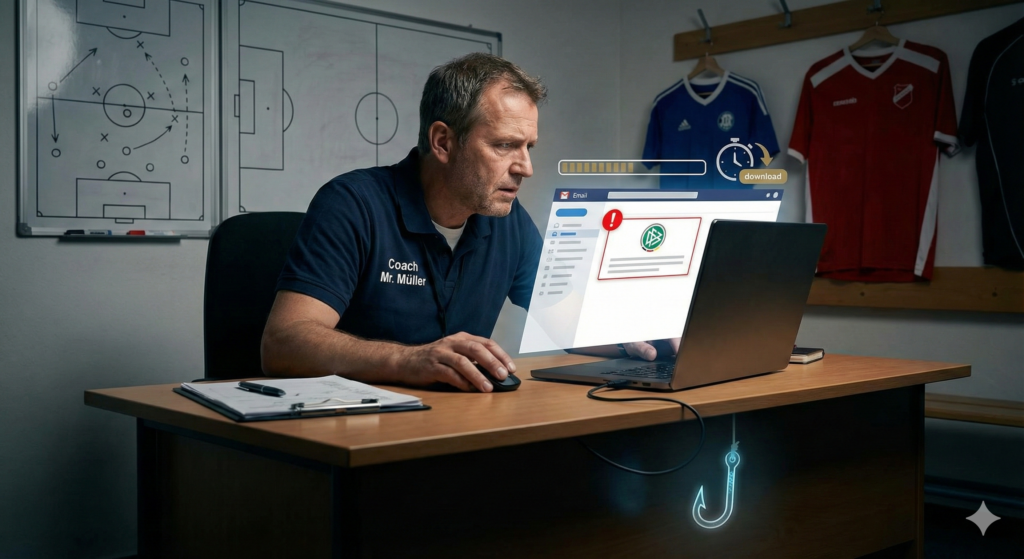
The story begins with Coach Mr. Müller on a typically hectic day, right before a crucial derby match. He is already under significant pressure, reviewing player performance and managing morning training sessions .
- The Trigger: In this high-stress environment, he receives an email with the alarming subject line: “Urgent: Upload the Team Roster for the Derby Match” .
- The Hook: The email appears to be from club management and threatens that failure to submit the list immediately could result in “penalties from the federation” . This manufactured urgency is a classic phishing tactic designed to force a quick, emotional reaction rather than a logical one.
- The Deception: The email features a professional signature and a sender address that looks legitimate at a glance, lulling Mr. Müller into a false sense of security .
2. The Breach: A Silent Compromise
Under time pressure, Mr. Müller makes a fatal error: he clicks the link without inspecting it. The module highlights that the link directs him to a fake website that mimics the club’s official portal .
- The Action: Believing he is performing a routine administrative task, he enters his login credentials and uploads the file .
- The Reality: At this moment, he has unknowingly handed the keys to his digital kingdom over to cybercriminals. The breach is silent; he closes the tab believing his work is done, unaware that a trap has been sprung .
3. The Fallout: Extensive Damage
The consequences of this single click are immediate and severe. Hours later, club management detects “strange activity” on his account, including the addition of a new email address and a modified team roster .
- Loss of Access: When Mr. Müller attempts to log in, he finds his password no longer works—the attackers have locked him out .
- Data Theft: The investigation reveals that sensitive data, including training details and players’ health data, has been stolen .
- Lateral Movement: The attackers used his compromised account to send further phishing emails to other staff members, leveraging his trusted reputation to expand the attack .
Why This Matters
This module goes beyond storytelling to analyze why the attack was successful. It emphasizes that cybersecurity in sports is not just an IT issue; it is a behavioral one. The attackers did not “hack” the system using code; they “hacked” the human by exploiting stress and authority . The module teaches that a coach’s vigilance is as important as their tactical knowledge; a breach can lead to competitive disadvantage (stolen tactics) and privacy violations (leaked health records) .
Comprehensive Defense Checklist
To prevent becoming the next “Mr. Müller,” participants are provided with an actionable checklist to verify digital communications.
Step 1: Scrutinize the Sender
- [ ] Verify the Domain: Do not rely on the display name (e.g., “HR Department”). Click on the sender’s name to reveal the actual email address. Does it match the club’s official domain exactly?
- [ ] Check for Inconsistencies: Look for subtle misspellings (e.g., “https://www.google.com/search?q=club-mngmt.com” instead of “https://www.google.com/search?q=club.com”) or the use of public domains (like Gmail) for official business.
Step 2: Analyze the Tone and Urgency
- [ ] Identify Artificial Pressure: Be immediately suspicious of emails that demand action “as soon as possible” or threaten negative consequences like fines or penalties .
- [ ] Question the Request: Ask yourself: “Does management normally ask for sensitive file uploads via a link in an email?” If the process feels different from the norm, pause.
Step 3: Inspect the Link (The Hover Test)
- [ ] Hover, Don’t Click: Move your mouse cursor over the link without clicking. A small box will appear showing the actual destination URL.
- [ ] Validate the URL: Does the destination URL match the text of the link? If the email says “Login to Portal” but the link goes to a random website, do not click .
Step 4: Immediate Incident Response
- [ ] Report Suspicious Activity: If you encounter a strange email, do not just delete it—inform your IT team so they can warn others .
- [ ] Act Fast if Compromised: If you suspect you have clicked a bad link, immediately change your password (if possible) and contact IT to lock the account. Speed is crucial to stop attackers from stealing data .
By mastering these steps, coaches transform from potential vulnerabilities into proactive defenders of their team’s digital integrity.
Ready to build your team’s complete digital defense? To view all training materials please visit the official SPARTA Project Page: https://secureusparta.de/